> ## Documentation Index
> Fetch the complete documentation index at: https://docs.herodotus.cloud/llms.txt
> Use this file to discover all available pages before exploring further.
# Applicative Recursion
> Applicative Recursion (AR) enables you to submit multiple queries to the same bucket and verify them together as a single on-chain operation.
## Overview
Applicative Recursion (AR) lets you group multiple Atlantic queries into a single
bucket and verify them together as one on-chain operation. This is useful for
batch workloads where you want one aggregated verification outcome.
## AR Flow
The Applicative Recursion workflow consists of four main steps:
### 1. Create Bucket
First, you need to create a bucket that will contain your related queries.
Create a new Atlantic bucket for grouping related queries
**Endpoint:** `POST /buckets`
**Required Parameters:**
* `aggregatorVersion`: The version of the aggregator to use (e.g., "snos\_aggregator\_0.14.1")
**Optional Parameters:**
* `externalId`: Custom identifier for the bucket
* `nodeWidth`: Width of the node (integer)
* `aggregatorParams`: Additional parameters for the aggregator
**Response:**
```json theme={null}
{
"atlanticBucket": {
"id": "bucket_123456",
"externalId": "my-custom-id",
"status": "OPEN",
"aggregatorVersion": "snos_aggregator_0.14.1",
"nodeWidth": 4,
"leaves": 0,
"createdAt": "2024-01-01T00:00:00Z"
}
}
```
### 2. Submit Queries with Bucket ID
Once you have a bucket, you can submit multiple queries to it. Each query must include:
* `bucketId`: The ID of the bucket you created
* `bucketJobIndex`: An incremental index (0, 1, 2, ...) for each query in the bucket
Submit queries to a bucket with incremental job indices
**Endpoint:** `POST /atlantic-query`
**AR-Specific Parameters:**
* `bucketId`: The ID of the bucket to submit the query to
* `bucketJobIndex`: The index of the job inside the bucket (must be sequential)
**Example Request Body:**
```json theme={null}
{
"declaredJobSize": "M",
"bucketId": "bucket_123456",
"bucketJobIndex": 0,
"programFile": "program.json",
"result": "PROOF_GENERATION"
}
```
**Important Notes:**
* Use the [Swagger UI](https://atlantic.api.herodotus.cloud/docs#/Atlantic%20Query/post_atlantic_query) for submitting queries due to file upload limitations
* Job indices must be sequential (0, 1, 2, ...)
### 3. Close Bucket
After submitting all your queries to the bucket, you need to close it to signal that no more queries will be added.
Close a bucket to finalize the batch processing
**Endpoint:** `POST /buckets/close`
**Parameters:**
* `bucketId`: The ID of the bucket to close
**Response:**
```json theme={null}
{
"atlanticBucket": {
"id": "bucket_123456",
"status": "IN_PROGRESS",
"aggregatorVersion": "snos_aggregator_0.14.1",
"chain": "L1",
"projectId": "proj_123",
"createdAt": "2024-01-01T00:00:00Z"
}
}
```
### 4. Wait for Results
Once the bucket is closed, Atlantic will process all queries in the bucket and aggregate the results. You can monitor the bucket status using the get bucket endpoint.
Check the status and results of your bucket
**Bucket Status Values:**
* `OPEN`: Bucket is open and accepting queries
* `IN_PROGRESS`: Bucket is closed and processing queries
* `DONE`: All queries in the bucket have been processed successfully
* `FAILED`: One or more queries in the bucket failed
## Managing AR Buckets
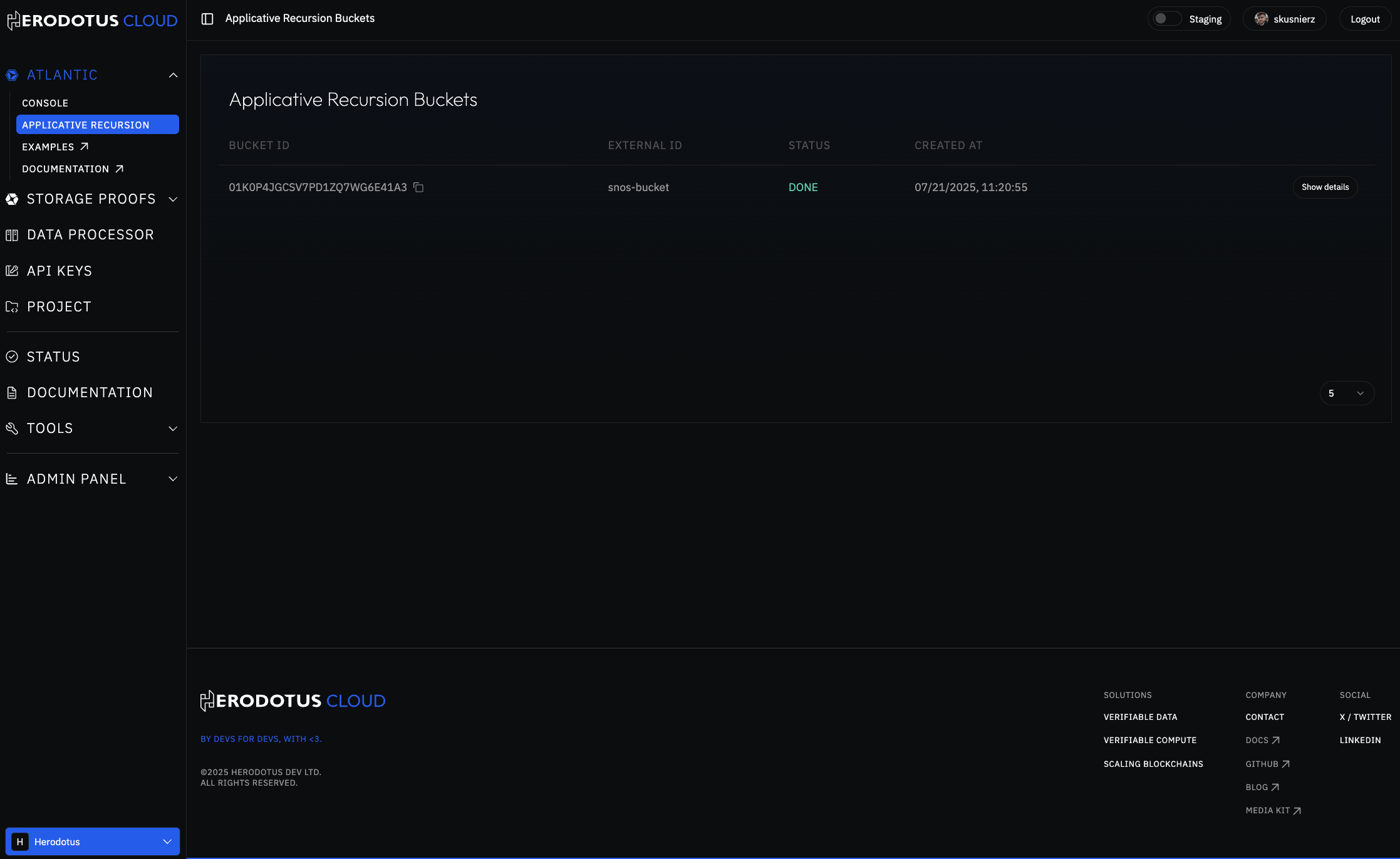
You can view and manage your **Applicative Recursion** buckets through the [Herodotus Cloud console](https://www.herodotus.cloud/en/buckets). The interface provides a comprehensive view of all your buckets with their current status and details.
 ## Bucket Details View
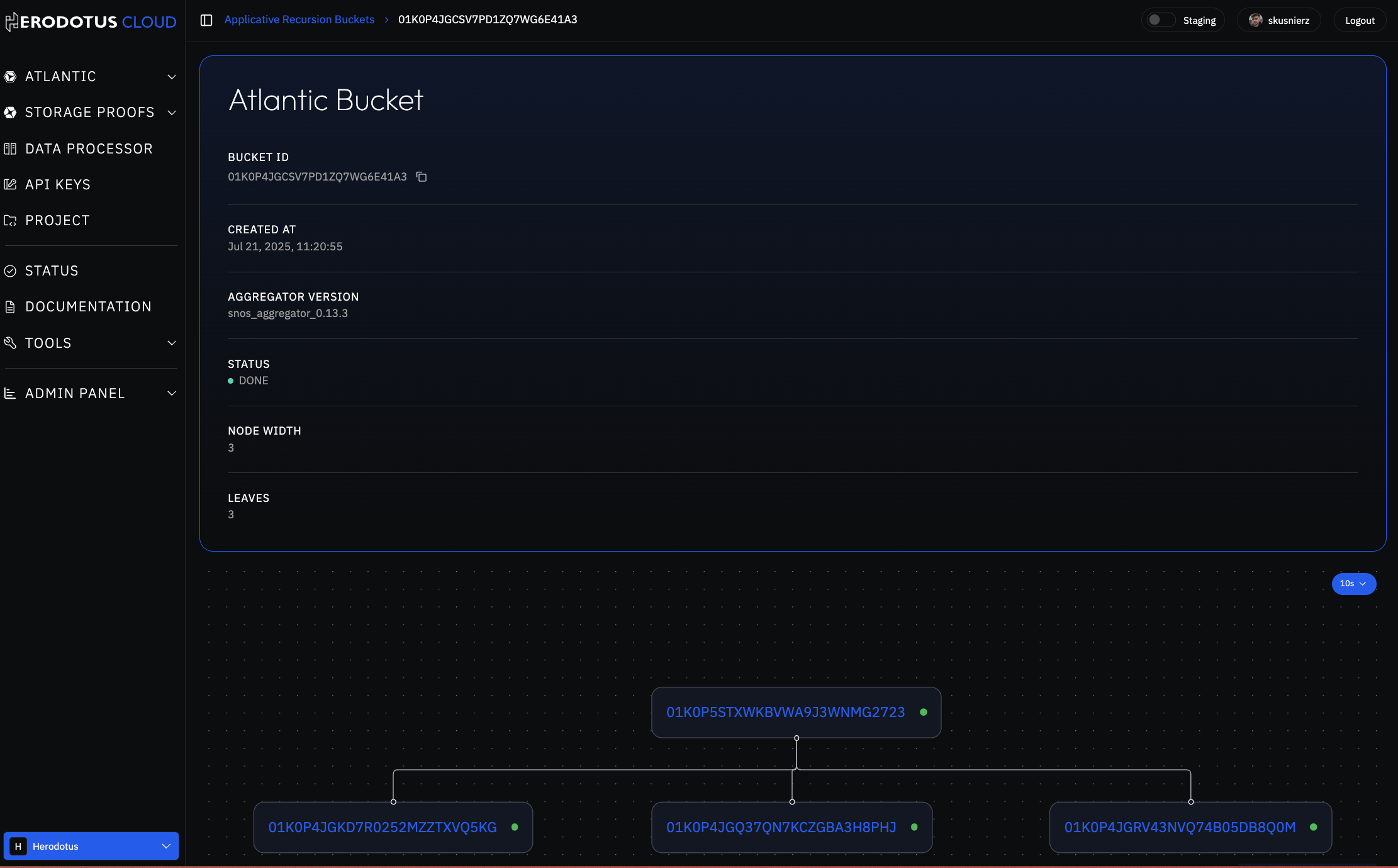
When you select a specific bucket, you can see its details.
## Bucket Details View
When you select a specific bucket, you can see its details.
 ## Bucket Tree Structure
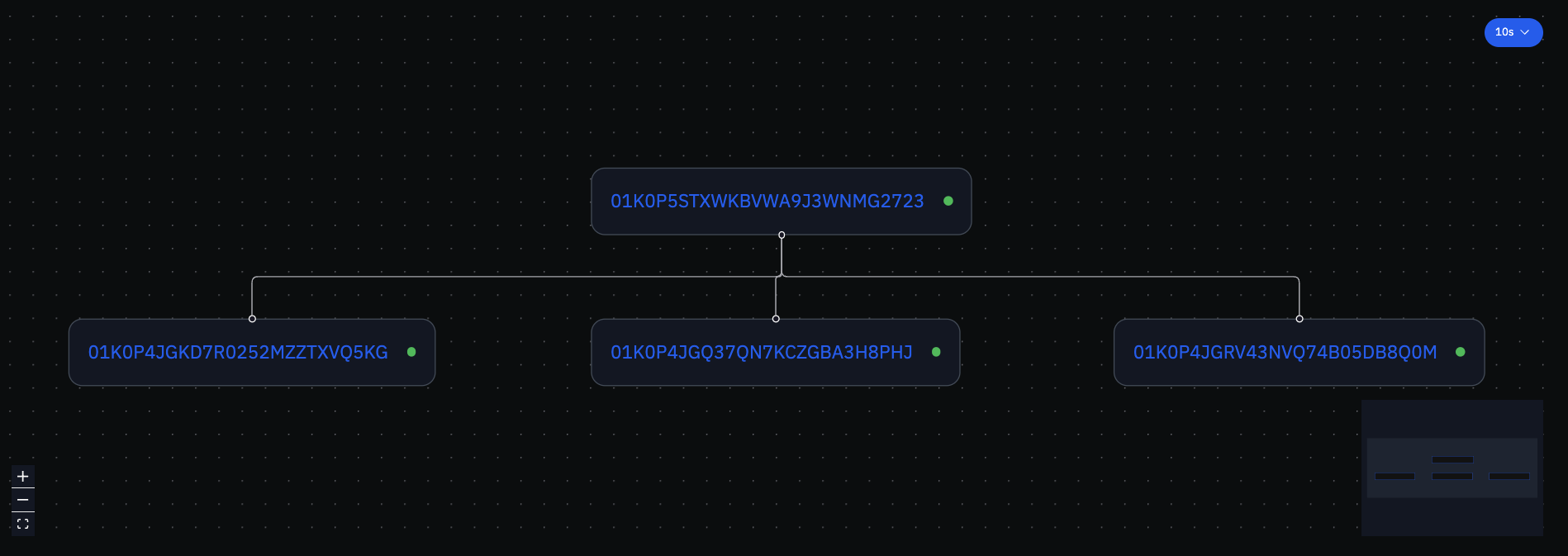
The **Applicative Recursion** system creates a tree-like structure.
## Bucket Tree Structure
The **Applicative Recursion** system creates a tree-like structure.
 ## Complete Example
Here's a complete example of using **Applicative Recursion**:
### Step 1: Create Bucket
```bash theme={null}
curl -X POST "https://atlantic.api.herodotus.cloud/buckets" \
-H "api-key: YOUR_API_KEY" \
-H "Content-Type: application/json" \
-d '{
"aggregatorVersion": "snos_aggregator_0.14.1",
"externalId": "my-batch-1"
}'
```
### Step 2: Submit Multiple Queries
```bash theme={null}
# Submit first query
curl -X POST "https://atlantic.api.herodotus.cloud/atlantic-query" \
-H "api-key: YOUR_API_KEY" \
-F "declaredJobSize=M" \
-F "bucketId=bucket_123456" \
-F "bucketJobIndex=0" \
-F "programFile=@program1.json" \
-F "result=PROOF_GENERATION"
# Submit second query
curl -X POST "https://atlantic.api.herodotus.cloud/atlantic-query" \
-H "api-key: YOUR_API_KEY" \
-F "declaredJobSize=M" \
-F "bucketId=bucket_123456" \
-F "bucketJobIndex=1" \
-F "programFile=@program2.json" \
-F "result=PROOF_GENERATION"
# Submit third query
curl -X POST "https://atlantic.api.herodotus.cloud/atlantic-query" \
-H "api-key: YOUR_API_KEY" \
-F "declaredJobSize=M" \
-F "bucketId=bucket_123456" \
-F "bucketJobIndex=2" \
-F "programFile=@program3.json" \
-F "result=PROOF_GENERATION"
```
### Step 3: Close Bucket
```bash theme={null}
curl -X POST "https://atlantic.api.herodotus.cloud/buckets/close?bucketId=bucket_123456" \
-H "api-key: YOUR_API_KEY"
```
### Step 4: Monitor Results
```bash theme={null}
curl -X GET "https://atlantic.api.herodotus.cloud/buckets/bucket_123456" \
-H "api-key: YOUR_API_KEY"
```
## Related Endpoints
View all your buckets
Get detailed bucket information
## Complete Example
Here's a complete example of using **Applicative Recursion**:
### Step 1: Create Bucket
```bash theme={null}
curl -X POST "https://atlantic.api.herodotus.cloud/buckets" \
-H "api-key: YOUR_API_KEY" \
-H "Content-Type: application/json" \
-d '{
"aggregatorVersion": "snos_aggregator_0.14.1",
"externalId": "my-batch-1"
}'
```
### Step 2: Submit Multiple Queries
```bash theme={null}
# Submit first query
curl -X POST "https://atlantic.api.herodotus.cloud/atlantic-query" \
-H "api-key: YOUR_API_KEY" \
-F "declaredJobSize=M" \
-F "bucketId=bucket_123456" \
-F "bucketJobIndex=0" \
-F "programFile=@program1.json" \
-F "result=PROOF_GENERATION"
# Submit second query
curl -X POST "https://atlantic.api.herodotus.cloud/atlantic-query" \
-H "api-key: YOUR_API_KEY" \
-F "declaredJobSize=M" \
-F "bucketId=bucket_123456" \
-F "bucketJobIndex=1" \
-F "programFile=@program2.json" \
-F "result=PROOF_GENERATION"
# Submit third query
curl -X POST "https://atlantic.api.herodotus.cloud/atlantic-query" \
-H "api-key: YOUR_API_KEY" \
-F "declaredJobSize=M" \
-F "bucketId=bucket_123456" \
-F "bucketJobIndex=2" \
-F "programFile=@program3.json" \
-F "result=PROOF_GENERATION"
```
### Step 3: Close Bucket
```bash theme={null}
curl -X POST "https://atlantic.api.herodotus.cloud/buckets/close?bucketId=bucket_123456" \
-H "api-key: YOUR_API_KEY"
```
### Step 4: Monitor Results
```bash theme={null}
curl -X GET "https://atlantic.api.herodotus.cloud/buckets/bucket_123456" \
-H "api-key: YOUR_API_KEY"
```
## Related Endpoints
View all your buckets
Get detailed bucket information